Chromium
Chromium is the open-source browser that Google Chrome is built on. It's a good second browser next to Firefox, for sites that only test with Chrome, or for Chrome's developer tools. Google Chrome itself is not in pacman, but it is in the AUR: yay -S google-chrome installs Google's own ARM64 build.
Install
pacman -Syu chromium
It's about 470 MB once installed. Open it from Applications > Internet > Chromium.
Compatibility note
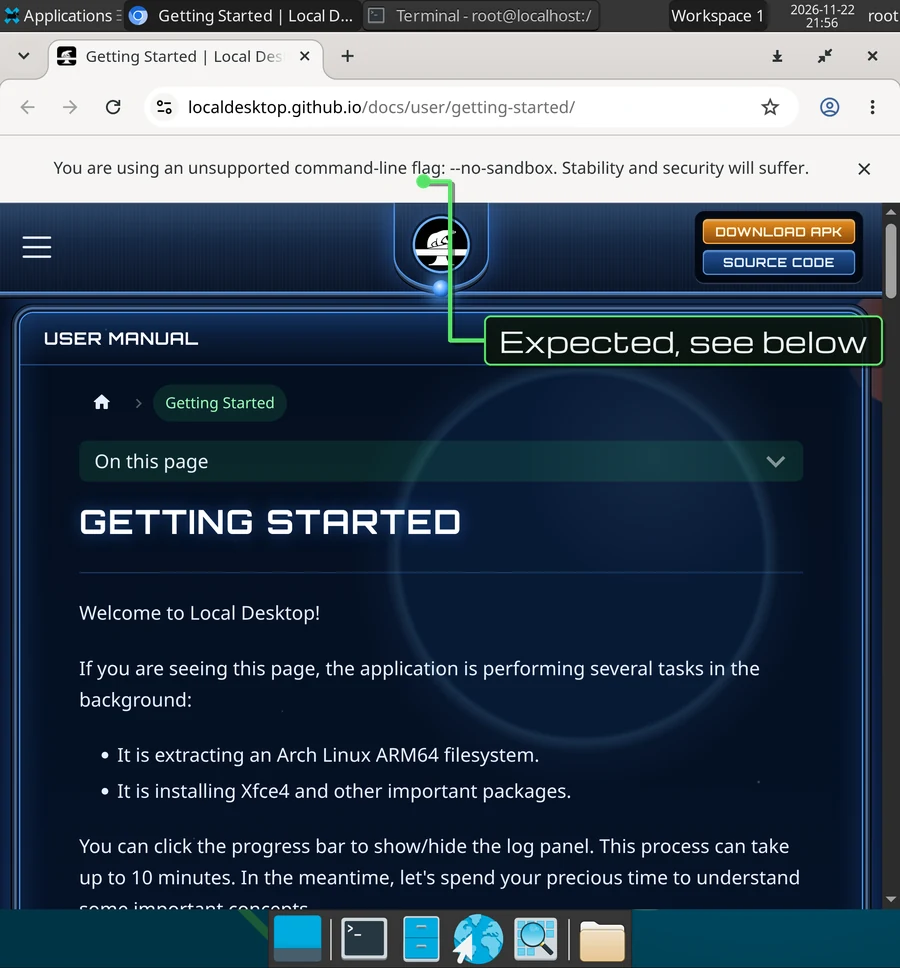
When Chromium opens, a yellow bar says:
You are using an unsupported command-line flag: --no-sandbox. Stability and security will suffer.
This is expected, and you can close the bar. Why?
Chromium normally runs every website in a sandbox, a locked-down process that can't touch the rest of your system, even if the site exploits a bug in the browser. That sandbox is built on Linux user namespaces, and Android doesn't let apps use them. Without the flag, Chromium doesn't start at all.
So Local Desktop adds --no-sandbox to the Chromium entry in the Applications menu, and does the same for every Chromium-based app it finds, each time the desktop starts. Visual Studio Code and other Electron apps get it through the ELECTRON_DISABLE_SANDBOX variable instead.
What it means for you: a website that manages to exploit a Chromium bug is not stopped by the sandbox, so keep Chromium up to date with pacman -Syu, and don't use it for sites you don't trust. Firefox in Local Desktop has a similar trade-off, see Firefox.
Start it from the terminal
As root, chromium adds the flag by itself. As a normal user, add it yourself:
chromium --no-sandbox
To make it permanent for your user, put the flag in Chromium's flags file:
echo "--no-sandbox" >> ~/.config/chromium-flags.conf
Tips
- Text too small or too big? Chromium follows the desktop's scale. You can also zoom each site with
Ctrl+andCtrl-, or set a default in Settings > Appearance > Page zoom. - WebGL: without GPU acceleration, Chromium turns WebGL off, so some 3D sites and map views use a slower mode or don't load.
- Sign in to sync? Chromium no longer supports signing in to a Google account to sync bookmarks and passwords. Use the export and import in Bookmarks > Bookmark manager, or a password manager's extension.