Reading the logs
When Local Desktop fails to start or crashes, the reason is almost always in the logs. Android keeps them in a buffer called logcat, and every app (Local Desktop, PRoot, and every Linux program it starts) writes to it. Please help us gather the logs using one of the methods below, and attach them to your bug report.
Via ADB
Setup
ADB is a command-line tool that can do many things when an Android device is connected to the computer via a USB cable. It can, for example, install and uninstall apps, copy files, grant special permissions, and capture logcat. You can download it from Android Developers official website or by using your package manager:
# Arch Linux
sudo pacman -S android-tools

# Ubuntu
sudo apt-get install android-tools-adb

# macOS
brew install android-platform-tools

# Windows
choco install android-platform-tools
Then connect your phone to your PC using a USB cable. The result of running adb devices should be like this:
~ adb devices
List of devices attached
RFCRC1S76SH	device
Common issues:
- Device not shown: You must also enable "USB debugging" on your phone. Please go to "Settings" > "Developer options" > "USB debugging" and turn it on. If "Developer options" is not visible, go to "Settings" > "About phone" > "Build number" and tap it 7 times.
command not found: adb: Make sure that you have set up the environment variables correctly so that your terminal can find theadbcommand.
Logcat
Local Desktop logs from several processes (the app itself, proot, PipeWire), so the most reliable filter is the app's user ID. Run the following commands to capture its logcat output:
APP_UID=$(adb shell pm list packages -U io.github.localdesktop | sed 's/.*uid://' | tr -d '\r')
adb logcat --uid=$APP_UID
Builds before v3.0.0 use the package name app.polarbear. If the first command prints nothing, replace io.github.localdesktop with app.polarbear.
- The command above will keep waiting for new logcat entries in real-time. You can stop watching by pressing
Ctrl + C. - You can run
adb logcat -cto clear old logcat entries so that you can start fresh. - To automatically save logcat output to a file so that you can share it with us, use the
>operator:
adb logcat --uid=$APP_UID > logcat.txt
- On Windows (or if the commands above don't work for you), capture everything instead with
adb logcat > logcat.txt. It's a bigger file, but it contains Local Desktop's logs too.
Via Logcat Reader
Setup
Logcat Reader is an Android app that can capture logcat directly from your phone. You can download it from Google Play.
You still need to connect your phone to your PC one time initially to enable the app to capture logcat output. The app will show you instructions on how to do this on first launch.
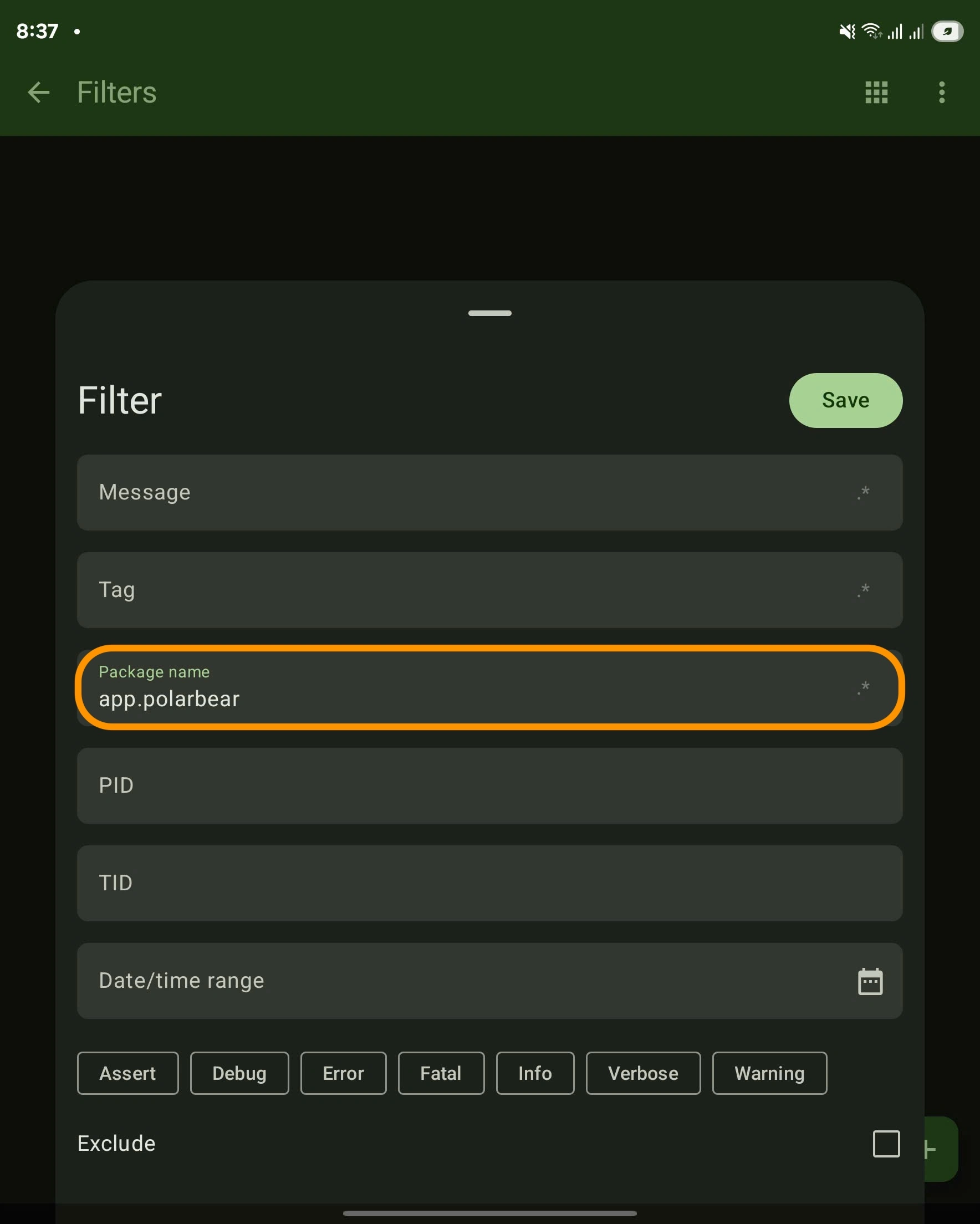
Click on the 3 dots menu > "Filters" > "+" > and set io.github.localdesktop as the "Package name".
Logcat
Please follow these steps to start capturing logcat:
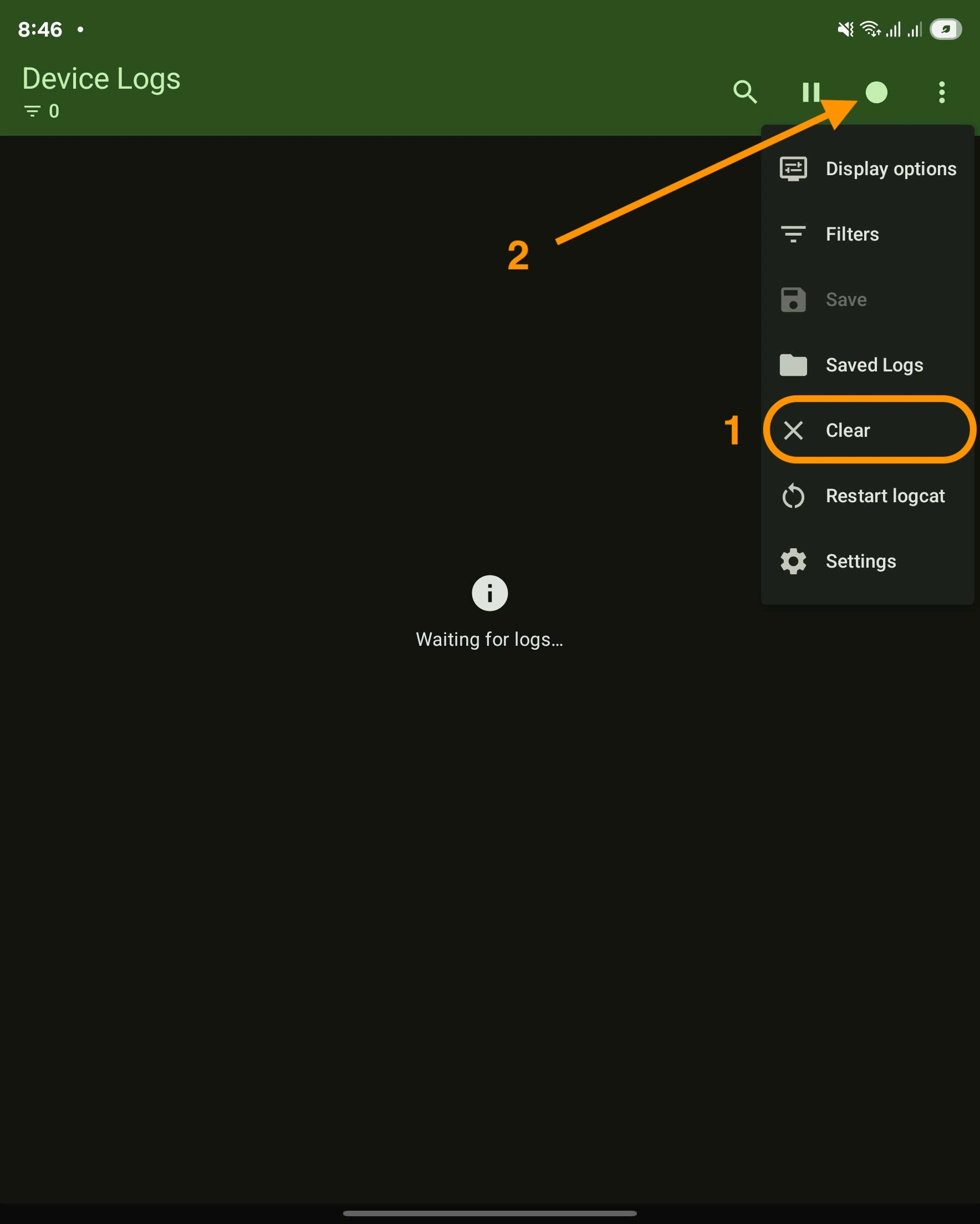
- Launch Logcat Reader, (optionally) clear the current logcat output to start fresh. Then click the circle icon to start capturing.
-
Exit Logcat Reader, then launch Local Desktop. Start reproducing the issue.
-
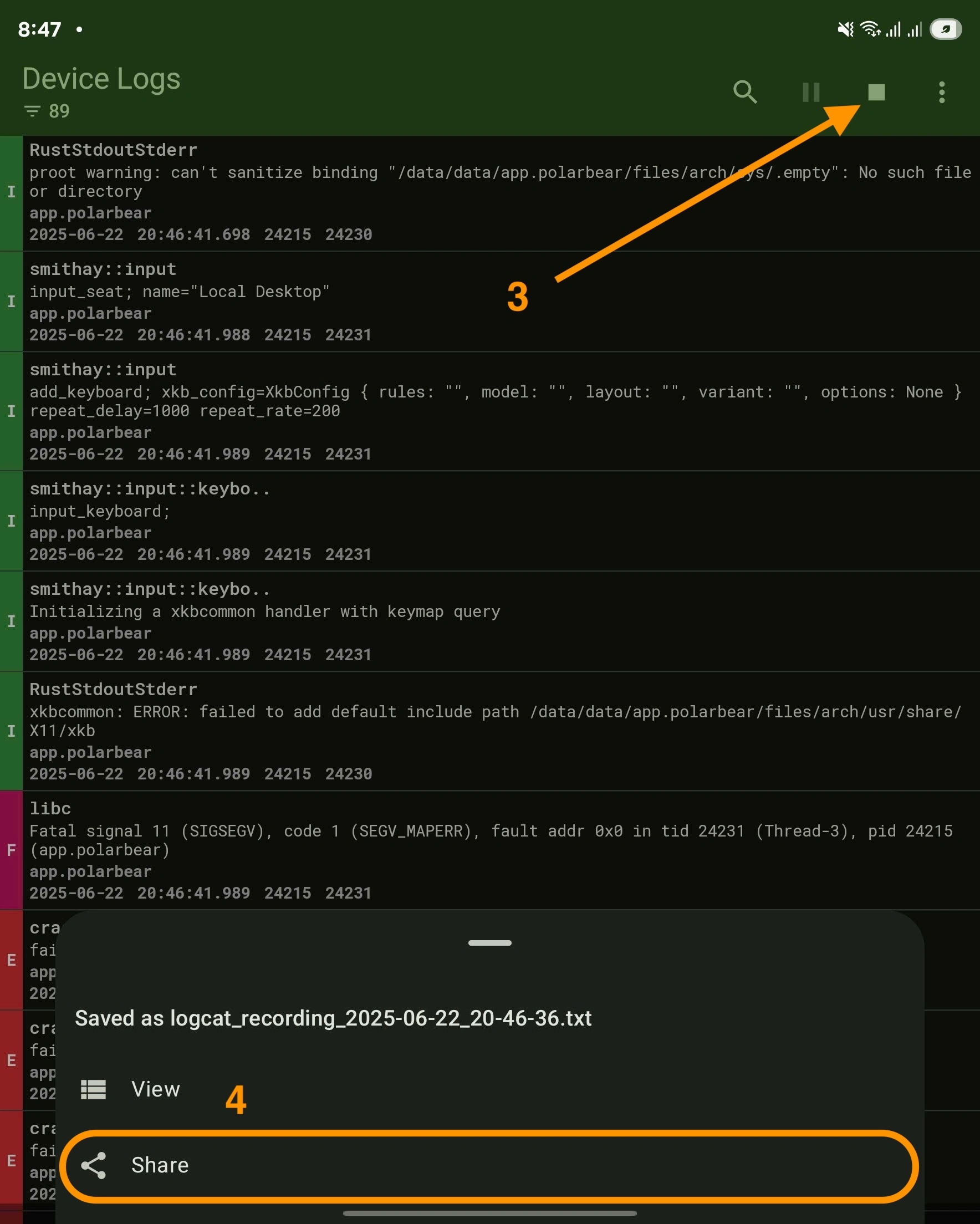
Exit Local Desktop (if it hasn't crashed already), then open Logcat Reader again. Click the square icon to stop capturing, and share the logcat with us.
Without a computer
On Android 11 and newer, you can run adb on the phone itself, from Termux, with Wireless debugging:
- Install adb:
pkg install android-tools - In Settings > Developer options > Wireless debugging, turn it on and tap Pair device with pairing code.
- Use split screen (or a floating window) to keep Termux and the Settings visible together, and run
adb pair 127.0.0.1:<pairing port>with the code shown. - Run
adb connect 127.0.0.1:<port>with the port shown on the Wireless debugging page.
Then follow the Logcat section above, in Termux.
How to read it
Local Desktop's lines use these tags:
| Tag | What |
|---|---|
RustStdoutStderr | Everything printed to stdout and stderr: Rust panics, and the output of Linux programs (pacman, the desktop session) |
localdesktop::… | Local Desktop's own logs, from the Rust log crate. The module path is cut to 23 characters, for example localdesktop::android:: |
LocalDesktopA11y | The physical keyboard service |
Lines that start with [PipeWireAAudio] come from the sound server. Debug builds log everything (Trace level), release builds log Info and above.
When you look for the cause of a crash, start from the end and look for panicked at, FATAL, E/ lines, or the last lines from RustStdoutStderr before the app stopped. A black screen with no error usually means the Launch command exited: the desktop's own error is often a few lines above.
If you work on the code, the repository's command-line tool does all of this in one command, including symbolicated native crashes. See Using the maintainer tools:
node vscode-extension/bin/localdesktop.cjs logcat --since launch --level W
node vscode-extension/bin/localdesktop.cjs crash_report
How to share
Please share the logcat output with your GitHub issue. Upload it as an attachment, or paste it in the issue description inside a code block. Logs can include file names and paths from your Linux system, so have a quick look before you post them.